
AWS Lambda has revolutionized how developers build and deploy applications by eliminating the need to manage infrastructure. With Lambda, you can run your code responding to events without provisioning or managing servers. This serverless approach brings tremendous flexibility, scalability, and cost-efficiency, but it also introduces a new layer of complexity:
The Lambda function lifecycle.
Understanding this lifecycle is crucial for building performant and cost-effective serverless applications. Whether you're debugging unexpected latency issues, optimizing function performance, or trying to reduce costs, a solid grasp of the Lambda lifecycle will help you make smarter architectural decisions.
The Big Picture: What is the Lambda Lifecycle?
When you deploy a Lambda function, it's easy to think that your code just "runs" whenever it's triggered — but under the hood, AWS Lambda goes through a defined series of steps to prepare, execute, and (possibly) reuse your function's execution environment.
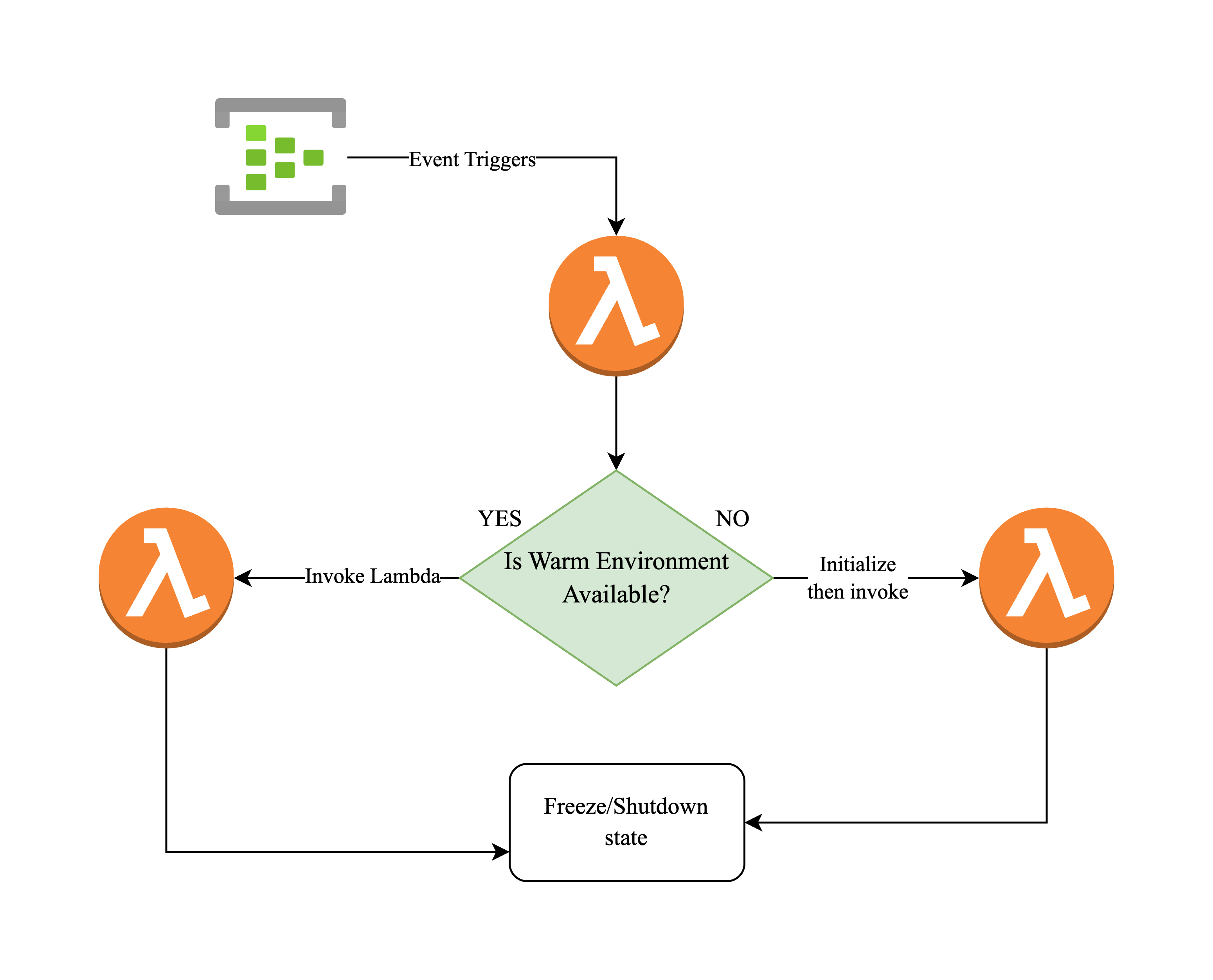
At a high level, the Lambda lifecycle consists of three core phases:
Init Phase – The environment is set up, your code is loaded, and everything outside your function handler is initialized.
Invoke Phase – Your function handler is triggered by an event, and the actual business logic runs.
Shutdown (or Freeze) Phase – The environment may be frozen to be reused later, or it may be terminated completely.
These phases are abstracted from you as a developer, but understanding them is key to optimizing performance and reducing latency. The behavior of Lambda during each phase influences factors like cold start latency, resource reuse, memory consumption, and even billing.
Here’s a simplified flow diagram of how it works:
Why This Matters
Each new concurrent execution of a Lambda function creates a new execution environment. These environments can be expensive to initialize (especially for cold starts), and AWS will try to reuse them when possible to reduce cost and latency.
This reuse introduces subtle behaviors, like global variables retaining state between invocations, that many developers overlook. Knowing how and when Lambda reuses environments can help you avoid bugs and improve efficiency.
The Three Phases of Lambda Lifecycle
To understand how AWS Lambda works behind the scenes, we need to explore each of its three lifecycle phases in detail: Init, Invoke, and Shutdown/Freeze. These phases dictate how your function is initialized, executed, and potentially reused. Let’s break them down:
a. Init Phase (Initialization)
This phase only occurs during a cold start, when AWS has to create a new execution environment for your function because none exists yet (or they were terminated).
What happens during Init:
Runtime is bootstrapped: AWS prepares the underlying runtime (Node.js, Python, Java, etc.) that your function uses.
Code outside the handler is run: Everything in your function file that is outside the handler function is executed. This includes:
Importing libraries
Initializing database connections
Setting up clients (e.g., AWS SDK clients, HTTP clients)
Loading large machine learning models or configuration files
Environment variables are made available.
Why Init Matters:
It significantly impacts cold start latency.
Anything you put outside the handler will only run once per environment, so use that space wisely to cache or reuse resources.
The time spent in Init counts toward provisioned concurrency warm-up time, but not toward the billed duration in an on-demand Lambda invocation.
b. Invoke Phase (Execution)
Once your function is initialized (either freshly or from a warm start), AWS executes the handler function, which is your actual business logic.
What happens during Invoke:
The event (e.g., HTTP request, S3 object event, SNS message) is passed to the handler.
The handler processes the event and returns a response or throws an error.
You are billed for the time your function spends in this phase, measured in milliseconds.
Key things to know:
Everything inside the handler runs every time.
Temporary files can be written to the
/tmpdirectory (max 512MB).Resources created during Init (like DB connections) can be reused here for better performance.
AWS allocates CPU power linearly with memory; more memory = faster processing (most of the time).
c. Shutdown or Freeze Phase
After the function finishes executing, AWS has two options:
Freeze the environment for reuse in the next invocation (this enables warm starts).
Shutdown the environment if it's idle for too long, or if AWS needs to reclaim capacity.
What may be preserved:
Initialized code and global variables
Open database connections (if kept alive)
Cached data in memory or files in
/tmp
What may be lost:
Anything dependent on stateful connections (e.g., idle timeouts on DB connections)
Execution environments that are terminated are gone forever, reinitialization will be needed
Important note: You can’t control when AWS freezes or terminates your environment, so always write your functions as if they could start cold at any time.
About the author
A digital entrepreneur, actively working as a data platform consultant. A seasoned data engineer/architect with an experience of Fintech & Telecom industry and a passion for data monetization and a penchant for navigating the intricate realms of multi-cloud data solutions.


